Provisioning Pipeline
How Spec form values flow through config snapshots and provider-specific mappings into Terraform variables.
Provisioning Pipeline
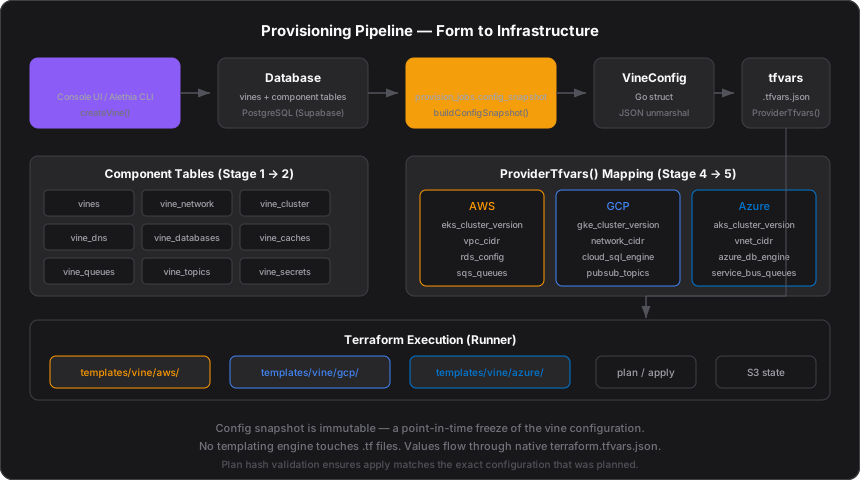
When a user clicks "Plan" or "Apply", the platform transforms the Spec's form configuration into Terraform variables through a five-stage pipeline. Each stage has a single responsibility: serialize, freeze, deserialize, map, execute.
Stage 1: Form → Database
The Spec form in Console (or alethia plan in the CLI) calls createSpec(), which inserts the configuration into normalized component tables:
| Table | Data |
|---|---|
specs | Project name, region, environment, cloud_identity_id, terraform_version |
spec_network | CIDR block, provision_network flag, existing network_id |
spec_cluster | K8s version, instance types, node min/max/desired, cluster_admins, provider_config |
spec_dns | Enabled flag, zone_id, domain_name, WAF settings (in provider_config) |
spec_repositories | Apps destination repo URL |
spec_databases | Engine, instance class, scaling config (per database) |
spec_caches | Node type, cluster size (per cache) |
spec_queues | Queue name, config (per queue) |
spec_topics | Topic name, subscriptions (per topic) |
spec_nosql_tables | Table/collection config with provider_config |
spec_secrets | Secret name and metadata |
Each table stores the shared schema. Provider-specific options live in provider_config JSONB columns — see Cloud Provider Abstraction.
Stage 2: Database → Config Snapshot
When a job is queued, buildConfigSnapshot() in app/server/actions/specs.ts queries all component tables in parallel and assembles a single JSON object. This object is stored in provision_jobs.config_snapshot.
The snapshot is a point-in-time freeze. Even if the user edits the Spec after queuing, the job executes the exact configuration that was planned.
config_snapshot = {
  ...spec fields,
  provider: "aws" | "gcp" | "azure",
  network: { provision_network, cidr_block, network_id, ... },
  cluster: { cluster_version, instance_types, node_min_size, ... },
  dns:     { enabled, zone_id, domain_name, provider_config, ... },
  databases: [...],
  caches:    [...],
  queues:    [...],
  topics:    [...],
  nosql_tables: [...],
  secrets:   [...],
  git_access_token: ""   // fetched at runtime, not stored
}
The git access token is intentionally left empty in the snapshot. The Runner fetches it at runtime via POST /api/jobs/{id}/git-token to avoid storing secrets in the job record.
Stage 3: Config Snapshot → SpecConfig
The Runner worker claims the job and deserializes the JSON snapshot into a strongly-typed Go struct:
func snapshotToSpecConfig(snapshot map[string]any) (*types.SpecConfig, error) {
    data, _ := json.Marshal(snapshot)
    var sc types.SpecConfig
    json.Unmarshal(data, &sc)
    return &sc, nil
}
The SpecConfig struct in packages/core/types/spec_config.go mirrors the snapshot shape with typed fields: Network, Cluster, DNS, Databases[], Caches[], and so on.
Stage 4: SpecConfig → terraform.tfvars.json
Each cloud provider implements a ProviderTfvars() method that maps SpecConfig fields to provider-specific Terraform variable names:
| SpecConfig Field | AWS | GCP | Azure |
|---|---|---|---|
ProjectName | project_name | project_name | project_name |
Region | region | region | location |
CloudAccountID | aws_account_id | project_id | subscription_id |
Network.ProvisionNetwork | provision_vpc | provision_network | provision_vnet |
Network.CIDRBlock | vpc_cidr | network_cidr | vnet_cidr |
Cluster.ClusterVersion | eks_cluster_version | gke_cluster_version | aks_cluster_version |
Cluster.InstanceTypes | eks_instance_types | gke_instance_types | aks_instance_types |
Databases[] | rds_config | cloud_sql_engine, ... | azure_db_engine, ... |
Caches[] | redis_instance_type | memorystore_instance_type | azure_cache_sku |
Queues[] + Topics[] | sqs_queues, sns_topics | pubsub_topics | service_bus_queues, service_bus_topics |
NosqlTables[] | ddb_table_configuration | firestore_databases | cosmos_db_collections |
StorageBuckets[] | bucket_configuration | cloud_storage_buckets | storage_containers |
The result is a map[string]interface{} written to terraform.tfvars.json via OverrideTfvarsFromMap().
No templating engine touches the .tf files. The Terraform templates at infra/templates/spec/{aws,gcp,azure}/ are plain HCL with variable declarations. Values are injected entirely through Terraform's native tfvars mechanism.
Stage 5: Terraform Execution
Template Selection
The Runner resolves the template directory based on SpecConfig.Provider — one of aws/, gcp/, or azure/ under the templates path.
Backend Configuration
Terraform state is stored in Supabase S3. The backend key follows the pattern {zone_id}/{project}-{env}-{region}/terraform.tfstate. See Terraform State.
Plan
terraform plan runs with the generated tfvars. For PLAN jobs, an Infracost analysis is also generated. The plan artifact is uploaded to Supabase Storage.
Apply
For DEPLOY jobs, terraform apply runs the plan. If a plan_job_id is linked, the cached plan artifact is downloaded and applied directly.
Post-Apply
After apply, the Runner extracts Terraform outputs (cluster endpoint, database endpoints, ARNs), configures kubeconfig via the provider, installs ArgoCD, and renders application templates. See GitOps & ArgoCD.
Plan Hash Validation
When a DEPLOY job references a prior PLAN job, the platform validates that the configuration hasn't changed between plan and apply. If the config_snapshot hash differs, the deploy fails with a hash mismatch error and the user must re-plan. This prevents applying a stale plan against a modified Spec.
Key Implementation Files
| Component | Location |
|---|---|
| Config snapshot builder | apps/console/app/server/actions/specs.ts — buildConfigSnapshot() |
| SpecConfig struct | packages/core/types/spec_config.go |
| AWS tfvars mapping | packages/core/cloud/aws_provider.go — ProviderTfvars() |
| GCP tfvars mapping | packages/core/cloud/gcp_provider.go — ProviderTfvars() |
| Azure tfvars mapping | packages/core/cloud/azure_provider.go — ProviderTfvars() |
| Deploy orchestration | packages/core/provisioner/deploy.go — RunDeployV2() |
| Snapshot deserialization | apps/runner/worker/runner.go — snapshotToSpecConfig() |
| Terraform CLI wrapper | packages/core/terraform/terraform.go |