Job Queue Pattern
How infrastructure operations are queued, claimed atomically, and executed by Runners.
Job Queue Pattern
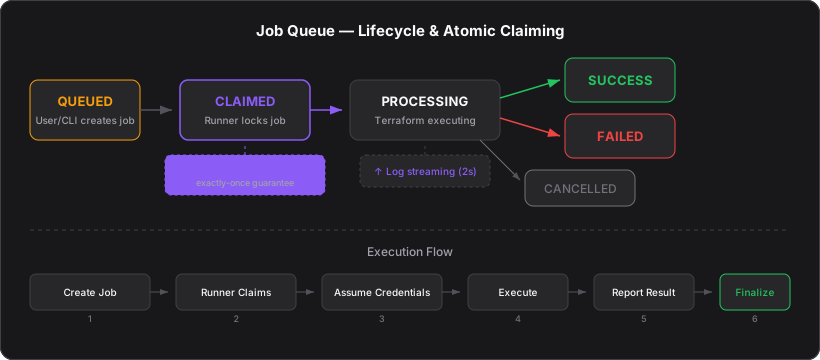
Every infrastructure operation in the platform — planning, deploying, destroying, connecting cloud accounts — is modeled as a job in a PostgreSQL queue. Runners poll for jobs, claim them atomically, execute them, and report results.
Why a Job Queue?
Infrastructure provisioning is slow (minutes to hours) and must be reliable. A job queue provides:
- Decoupling — the web UI and CLI queue work without waiting for completion
- Exactly-once execution — atomic claiming prevents two Runners from running the same job
- Resumability — if a Runner dies, the job can be retried from persisted Terraform state
- Auditability — every operation is logged with timestamps, status, and metadata
Job Types
| Type | Purpose | Triggered By |
|---|---|---|
CONNECTION_TEST | Verify cloud credentials, cache discovered resources | Connecting a cloud provider |
FETCH_RESOURCES | Refresh cached VPCs, subnets, hosted zones | Manual refresh in UI |
PLAN | Run terraform plan + optional Infracost analysis | Clicking "Plan" on a Spec |
DEPLOY | Run terraform apply + install ArgoCD | Clicking "Apply" on a Spec |
DESTROY | Run terraform destroy | Clicking "Destroy" on a Spec |
DEPLOY_WORKER | Provision Runner infrastructure (ECS task, IAM roles) | Adding a cloud-hosted Runner |
UPDATE_WORKER | Update Runner to latest release | Clicking "Update" on a Runner |
DESTROY_WORKER | Tear down Runner infrastructure | Removing a cloud-hosted Runner |
Job Lifecycle
QUEUED ──► CLAIMED ──► PROCESSING ──► SUCCESS
                          │
                          ├──► FAILED
                          │
└──► CANCELLED| Status | Meaning |
|---|---|
QUEUED | Waiting for a Runner to pick it up |
CLAIMED | A Runner has locked it (prevents double-execution) |
PROCESSING | Runner is actively running Terraform |
SUCCESS | Completed successfully |
FAILED | Failed with error message |
CANCELLED | User cancelled before completion |
Atomic Job Claiming
The critical invariant: exactly one Runner executes each job. This is enforced by PostgreSQL's FOR UPDATE SKIP LOCKED:
CREATE OR REPLACE FUNCTION claim_next_job(p_worker_id uuid)
RETURNS provision_jobs AS $$
DECLARE
  job provision_jobs;
BEGIN
  SELECT * INTO job
  FROM provision_jobs
  WHERE status = 'QUEUED'
  ORDER BY created_at ASC
  FOR UPDATE SKIP LOCKED
  LIMIT 1;

  IF job IS NOT NULL THEN
    UPDATE provision_jobs
    SET status = 'CLAIMED',
        worker_id = p_worker_id,
        claimed_at = now()
    WHERE id = job.id;
  END IF;

  RETURN job;
END;
$$ LANGUAGE plpgsql;
FOR UPDATE SKIP LOCKED is the key mechanism. If Runner A has locked a row, Runner B's query skips it entirely rather than waiting. B either gets the next queued job or gets nothing. No distributed locks, no coordination — just PostgreSQL.
Config Snapshot
When a job is created, the current Spec configuration is serialized as a config_snapshot in the job record. This ensures the Runner executes exactly the configuration that was planned, even if the user modifies the Spec after queuing.
For DEPLOY jobs, a plan hash is validated: if the Spec config changed since the plan was generated, the deploy fails with a hash mismatch error, forcing the user to re-plan.
Job Execution Flow
Job Created
User clicks "Plan" / "Apply" / "Destroy" in the UI (or runs alethia plan / alethia apply / alethia destroy in the CLI). A provision_jobs row is inserted with status QUEUED.
Runner Claims Job
A Runner's poll loop calls POST /api/jobs/claim. The server executes claim_next_job(). If a job is returned, the Runner proceeds.
Credential Assumption
The Runner reads the cloud_identity from the job and assumes temporary credentials — STS AssumeRole (AWS), WIF token exchange (GCP), or federated identity (Azure).
Execution
The Runner runs the job-type-specific logic (Terraform plan/apply/destroy, ArgoCD install, etc.) while streaming logs.
Result Reporting
On completion, the Runner calls PUT /api/jobs/{id}/status with SUCCESS or FAILED, plus execution metadata (Terraform outputs, cost data, cluster info).
Finalization
For DEPLOY jobs, Console calls finalizeDeployment() to extract cluster metadata from Terraform outputs and update the Spec's component tables (cluster endpoint, ArgoCD URL, database endpoints, etc.).
Failure Recovery
When a Runner dies mid-job:
- Heartbeat stops → Console marks Runner OFFLINE after 60 seconds
- Job stays in PROCESSING with no new log updates
- After 5 minutes of no log activity, Console marks the job FAILED
- User can retry the job — creates a new job with the same config
- Terraform state is preserved in Supabase S3, so the retry continues from the last successful state
Real-time Status Updates
Job status changes are broadcast via Supabase Realtime. The UI subscribes to provision_jobs UPDATE events and updates the jobs store in real-time. The job detail page also subscribes to provision_job_logs INSERT events for live log streaming.